The 10-minute checkup
Ten checks, each one a hole I've watched real money leave through. Grab your phone and the browser you use for crypto, then tap every line below that's true for you. Your score at the end of the chapter fills in as you go. Words with a dotted underline have a short explanation: tap one to read it. The full glossary is Chapter 11.
This guide covers Ethereum and the chains that work like it (Base, Arbitrum, Optimism, Polygon, BNB Chain and the rest), plus TRON. Solana and Bitcoin have their own tricks, and they aren't covered here.
Being drained right now? Skip to the emergency steps at the end of this chapter. They're free.
Written by @DrunkDeploy. New drain patterns land on X first, so follow along there.
If you do one thingFind out where your seed phrase physically lives. If any copy is digital, plan the move to a wallet with a new seed today.
1. Where does your seed phrase live?
Your seed phrase is the 12 or 24 words you wrote down when you created the wallet (MetaMask calls it your Secret Recovery Phrase). Picture the exact physical place. If any copy exists as a photo, a file or a message, anyone who finds that copy controls the money, whatever device you use to sign. To find copies you forgot, search your Photos app for "recovery", "phrase", "seed" and "wallet": iPhone and Google Photos both find text inside screenshots. Then search your notes, email drafts and Telegram Saved Messages for the same words.
Where seeds leak
- Photo gallery and old screenshots
- iCloud or Google Photos sync
- Notes, Docs, email drafts
- Telegram Saved Messages
- Any website, form or "sync" page
Where a seed belongs
- Paper, written by hand
- A steel plate if you worry about fire
- Two copies in two places
- Typed only into the wallet itself
DangerIf you have ever typed or pasted your seed anywhere except the wallet app itself during setup, assume it is burned. Revoking approvals will not help you. Do the emergency steps at the end of this chapter and move the funds.
2. What have you approved?
Open revoke.cash and paste your address. You don't need to connect a wallet to look. Go through every chain you have ever used. Not sure which ones? Open your address on Etherscan: the Multichain Info box lists the other chains it was found on. DeBank shows your balances on every chain without connecting.
Watch for Permit2 in the list. It's a shared contract that Uniswap and other apps use. If you still swap there, an approval to Permit2 is normal. If you don't, revoke it: one revoke cuts off every app behind it for that token.
That last one surprises people. An allowance to a marketplace or an old project on an empty token balance is a mine. It sits quietly until the day tokens arrive, then it fires. I watched one go off 12 seconds after 260 WETH landed in a wallet. Chapter 4 explains why the bot got only 4.9 of the 260 WETH, and why a swap router you call yourself, like Uniswap's, is low priority.
3. Has your wallet been "upgraded"?
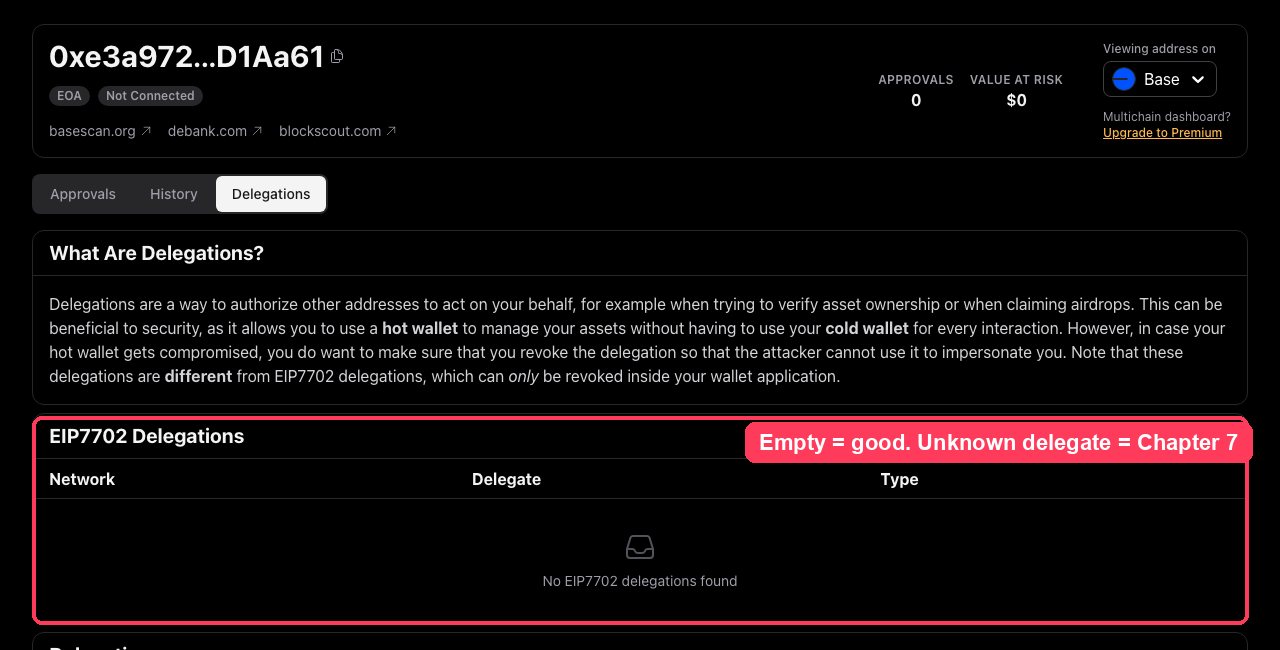
Since May 2025 a normal wallet address can be switched to run smart-contract code with one signature. This is called a delegation. Wallets use it for legit features like paying several things in one go. Attackers who already have your key use it to install a sweeper: code that forwards every coin you receive straight to them.
For the curious
The feature is EIP-7702, added in Ethereum's Pectra upgrade. In the first weeks after Pectra, Wintermute found that over 97% of all 7702 delegations pointed at copies of the same sweeper code.
How to check: on revoke.cash open the Delegations tab, or look for a "Delegated to" line on your address page on Etherscan or Basescan. Delegations are set per network, and the Delegations tab checks every network it supports at once, showing which one each delegation is on.
A delegation to your own wallet's contract is normal. MetaMask can switch an account to its "smart account" by itself, usually during the first swap that needs it. Etherscan then shows MetaMask: EIP-7702 Delegator. In MetaMask you can see it under the account's ⋮ menu → Account details → Smart account. Anything else you didn't set up is the alarm: do the emergency steps at the end of this chapter now.
4. Accounts and browser
Whoever controls your email can reset your exchanges and everything else. And the browser that holds your wallet is where most malware and fake sites find you.
5. Sending and the escape hatch
Poisoned look-alike addresses live in your transaction history, waiting for you to copy them. And when something goes wrong, you need a safe address ready to move funds to within minutes.
In MetaMask the address book is the main menu (top right) → Manage → Contacts → Add contact. MetaMask on your phone has the same Contacts entry in its main menu. How to make the escape wallet is in Chapter 2.
Score
The box below counts what you ticked. Your next step depends on which boxes are still empty.
These open boxes come first, whatever your count:
| Open box | What to do |
|---|---|
| You typed or pasted your seed somewhere (section 1, second box), or there's a delegation that isn't your own wallet's (section 3) | Urgent. Do the emergency steps at the end of this chapter now |
| Your seed has a photo, cloud or chat copy (section 1, first box) | Set up a new wallet this week and move everything to it (Chapter 2) |
Otherwise, count the open boxes:
| Open boxes | What it means |
|---|---|
| 0 | Rare. Read Chapters 3 and 6 to stay that way |
| 1-2 | Normal. Fix them today, the fixes take minutes |
| 3+ | Common on a first pass. Do the three "Do it tonight" steps in Chapter 2, then come back and tick again |
If it's happening right now
These are the same eight steps that open Chapter 7. They're free because nobody should have to pay in the middle of a drain.
- Stop signing anything and close the site you were on
- Open your address on the block explorer and work out which kind of drain it is
- Save what's left. Approval drain: revoke that approval, then move the rest anyway. Leaked key: move everything to your escape wallet, biggest asset first, and never send gas into the hacked wallet
- Open @seal_911_bot on Telegram for free expert help
- Write down every transaction hash, attacker address and what you did before it started
- Report to exchanges, the police and Chainabuse
- Ignore every "recovery expert" who DMs you
- Find the root cause before you make new wallets
How to tell a drain apart: if only one token or one collection left and your ETH is still there, it's usually an approval drain. If ETH and several tokens left at once, or tiny ETH deposits arrive and leave right away, treat the key as leaked.
No escape wallet yet? Install Rainbow on your phone from the link on its official site. Create a new wallet and write the 12 words on paper. Skip the iCloud or Google Drive backup. Use that address. Never "Account 2" in the hacked wallet app: same seed.
Anyone who DMs you "from SEAL" or from support: make up a sentence, send it to them, and ask them to repeat it inside your ticket in @seal_911_bot. Only a real SEAL member can post there. Never share a seed phrase with anyone.
Now close the boxes you couldn't tick.
The checkup shows where you're exposed. The full guide shows how to fix each one, with real drains taken apart on-chain, annotated wallet prompts and a field guide to 40 scams.
Undrainable by @DrunkDeploy · Degen Studio · Edition 1.0 · updated 8 Oct 2026. Education, not financial or legal advice.